The new version of Handbrake supports video convertion, combine the dvd ripping, it is really a powerful app for multimedia entertainment. More important is that it is free, totally free. So you can touch it everywhere as so many people talking about it. iSkysoft Studio released
iSkysoft iMedia Converter for Mac which also can rip dvd and convert video. It is shareware and cost you $49.
What is the different between both?

The most rumor, from not only my friends but also other, said handbrake is hard to understand. I was work as a developer for half and a year, so I can read it well, but for you who are blank to the program, there is also a way. Just choose an output device for as on the screenshot below, the settings fit for will automatically load to the
main window, you no need to change the default settings, just add to queue to be waiting for conversion.
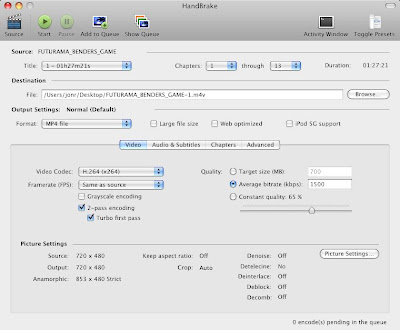
Below are the main-window screenshots for both, I will show the differences between the two :
For Mac Handbrake:
For iSkysoft iMedia Converter for Mac:
 Part 1: Functions in common.
1. Settings: Change video Resolution,frame rate,bit rate, encoder
2. Edit: Crop
3. Change output file name/save path
Part 2: formatFor Handbrake:
Supported import video: MP4, FLV, VOB, HD(MTS, TS, TRP, M2TS, TP, AVI, MPG), 3GP, 3G2, MOV, MOD, M4V, MPG, MPEG, DAT, MKV, WMV, MOD, ASF
Supported import dvd: DVD folder, .iso
Supported export video: User define AVI/MP4/OGM/MKV, iPod/QuickTime M4V, iPhone/iPod Touch/AppleTV MP4, High quality MKV, PSP/PS3/Xbox 360 MP4, Normal quality MP4.


For iSkysoft iMedia Converter for Mac
Supported import video: MP4, FLV, VOB, HD(MTS, TS, TRP, M2TS, TP, AVI, MPG), 3GP, 3G2, MOV, MOD, M4V, MPG, MPEG, DAT, MKV, WMV, MOD, ASF
Supported import dvd: DVD folder, .IFO
Supported import audio: MP3, MKA, AAC, WAV, WMA, M4A, APE, OGG, MP2, AC3
Supported export video: MP4, FLV, AVI, MKV, XVID, ASF, MOV, M4V, MPG, VOB, 3GP
Supported export audio: MP3, MKA, AAC, WAV, WMA, M4A, APE, OGG
Supported pic format: JPG, BMP(for snapshot)
 Part 3: Function in different for Handbrake.
1. Settings:
a) Audio Sample Rate; Audio Bit Rate; Audio Encoder; Audio Channels
b) Audio track, can only choose one audio track for a dvd output.
2. Edit:
a) Video filters: Detelecine; Deinterlace; Decomb; Denoise; Deblock.
Specification.
b) Advance: Frames; Motion; Analysis; ETC..
Specification. If you can not understand well, do not be pastiche.

3. Other:
a) System Requirement: MAC OS X 10.5
b) Support multi-audio track.

c) Choose any the sequential chapters you want.
d) Preview the video frame pic.
Part 4: Function in different for iSkysoft iMedia Converter for Mac.1. Settings:
a) Audio Sample Rate; Audio Bit Rate; Audio Encoder; Audio Channels
b) Audio track, can only choose one audio track for a dvd output.

2. Edit:
a) Change the brightness/contrast/saturation/adjust effect
b) Flip vertically, flip horizontally
c) Trim episode
d) Create watermark

3. Other:
a) System Requirement: MAC OS X 10.4 or above operating system(include MAC OS X 10.5 Leopard)
b) Snapshot
c) Merge the chosen files into one file
d) Custom output format
e) Choose any chapters you like from dvd to rip.
f) Real time preview.
g) Support audio import and export
Tip:
1. For Handbrake, If you want a better ripping speed, using mac the ripper make a copy of the dvd to your
hard drive first.
2. For Handbrake, after all the settings, you need to click ‘Add to Queue’ to add the task, otherwise the task will be ignored.
3. For iSkysoft iMedia Converter for Mac, if you want to apply the settings to all the dvds or videos in the list, click ‘Apply to all’.
General speaking, if you do not need edit, handbrake is enough for you. But handbrake can not decrypt commercial DVDs except css protection dvds. iSkysoft iMedia Converter for mac is easy to control that means more user-friendly as it is a shareware. I have tons of videos and dvds, I used to iSkysoft iMedia Converter for mac to crop and trim the wonderful parts to share with my families and friends or make a watermark to upload to share online or just put in my psp slim or iPod video. Here I also would like to recommend
iMovie to edit videos, which can edit videos more professionally and powerfully than iSkysoft iMedia Converter for Mac. But the supported input video formats is limited and can not support the import of dvds.
If you are insterested in iSkysoft iMedia Converter for Mac, here is a demo.


